When you earn money online, PayPal is one of the easiest ways to get paid. It is the defacto standard for those who make money online in terms of getting paid quickly and easily.
Setting it up is easy and getting paid is as easy as someone using your designated PayPal e-mail address. When someone pays you, the system walks them through a process and there isn’t a PayPal account number to be concerned with. They simply allocate the payment to the address you provided PayPal with when you set up your account. When someone pays you, you’ll get an e-mail notification at the same address.
There are things you should know about a PayPal account and here are some basic tips and PayPal FAQ’s for beginners:
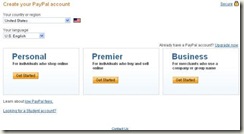
Personal PayPal Accounts
Basic / personal accounts are free. You don’t have to pay any fees from amounts you are paid. As soon as you exceed a dollar value received per month and / or someone attempts to pay you with a credit card, your account needs to be upgraded to a Premier account. When that happens, you’ll pay a % of every payment.
Everyone is allowed (per PayPal Terms of Service) to have two accounts so it is advantageous to keep a basic account and sign up for a premium account as well. A lot of people start off with a Personal account and upgrade (or start a second account) later on.
Premier PayPal Accounts
The premier account will require you to pay a fee. This ranges depending on several factors including:
- What type of payment is made to you (cash payment or credit card)
- The amount of the transaction
- Where the payment is coming from (Some countries have surcharges on payments)
When you receive your payment, you’ll get a notice via email either that:
- You have new funds
- Funds are on the way
When you have new funds, the money is in your account (minus any fees) and you can use it to spend online, transfer to your bank account, or you can request that a cheque be sent to you.
How long does it take for PayPal payments to transfer to your bank?
When you transfer it to your bank account, the transaction typically takes 2-3 days (although PayPal stipulates up to 10 business days). You’ll probably notice a pattern after a few transfers that tell you how long your bank takes to receive the money and what time the funds usually arrive.
If you receive a notice that tells you funds are on the way, someone has sent you an e-check. E-checks can take up to a few weeks to clear and all you can do is wait for a notification from PayPal that says the funds cleared.
Setting up your bank account on PayPal
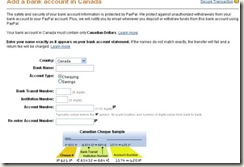
You can set up a bank account easily. You provide PayPal with your bank information and then wait a few days. You’ll see two amounts (below $1.00 each) deposited into your bank account. When those amounts arrive, you simply log in to PayPal and confirm the amounts received. PayPal does this so they can determine they have your correct banking information for future deposits.
PayPal Bank Withdrawals
If you attempt to pay an invoice that you don’t have the funds for, it will initiate an e-check from your primary bank account in the PayPal system so it’s important to be careful when making payments. If you live in Canada or the UK and you have an available balance in your US funds account, you’ll need to move money between currencies to purchase something online or make a payment in another currency otherwise, it will initiate an e-check.
If you live in the U.S, PayPal will give you a debit card that allows you to make purchases or withdrawals from an ATM bank machine. You can also make withdrawals to your own bank account.
Beyond the fees you pay when you receive your money, if you transfer a small amount of money to your bank account (under $150.00) you’ll also be charged a transaction fee of $0.50. This is removed from your transfer fee.

PayPal Payments
If you try to make a payment in a currency for which you have a zero balance, an e-check can be initiated and this can take weeks to clear and your bank may have service charges if the e-check cannot be processed due to insufficient funds.
While PayPal does have fees, this service is definitely a must-have for anyone who wants to work at home and make money with their computer. It’s a fast and safe way to make and receive payments.
You can run plenty of reports from PayPal to help you with your records and they have other tools such as invoicing tools as well. Once you do get a lot of money happening in your account, they also offer PayPal merchant services and you can benefit from a lot of tools to help your online business run smoothly.